
Release Notes

Be on Top With New Features & Fixes

Improvements, bug fixes, and addressing security vulnerabilities

The versions listed includes both improvements, bug fixes, and addressed potential security vulnerabilities. While we highlight key changes in these notes, please note that not all updates may be detailed here. It’s a reflection of our ongoing commitment to enhance performance and user experience while ensuring the safety of your data. We recommend going through the information provided for a snapshot of the most pertinent changes.

Version 6.3.16
17. April, 2026
Welcome to the latest update. We've made several improvements, bug fixes, and addressed potential security vulnerabilities in this release. While we highlight key changes in these notes, please note that not all updates may be detailed here. It's a reflection of our ongoing commitment to enhance performance and user experience while ensuring the safety of your data. We recommend going through the information provided for a snapshot of the most pertinent changes.

Improvements

INSTALL & UPGRADE 
  • Updated Apache Tomcat to version 10.1.54.

Bug Fixes

BACKEND
  • Resolved an issue with incorrect time zone handling in catering notifications.
OUTLOOK CATERING ADD-IN
  • Fixed an error that could occur when adding a comment to an order.
  • Corrected an issue where serving locations were not updated properly.
  • Standardised email formatting so catering emails are now consistent regardless of origin.
Version 6.3.15
27. March, 2026
Welcome to the latest update. We've made several improvements, bug fixes, and addressed potential security vulnerabilities in this release. While we highlight key changes in these notes, please note that not all updates may be detailed here. It's a reflection of our ongoing commitment to enhance performance and user experience while ensuring the safety of your data. We recommend going through the information provided for a snapshot of the most pertinent changes.

Improvements

BACKEND
  • Upgraded Apache Tomcat to version 10.1.53 to improve stability and security.

Bug Fixes

CATERING
  • Fixed an issue where emails were incorrectly sent for outdated catering orders.
Version 6.3.14
27. February, 2026
Welcome to the latest update. We've made several improvements, bug fixes, and addressed potential security vulnerabilities in this release. While we highlight key changes in these notes, please note that not all updates may be detailed here. It's a reflection of our ongoing commitment to enhance performance and user experience while ensuring the safety of your data. We recommend going through the information provided for a snapshot of the most pertinent changes.

Improvements

BACKEND
  • Improved the Details call via EWS (Exchange Web Services) to prevent unnecessary permission errors when retrieving calendar entry details.

Bug Fixes

DESKTOP
  • Fixed an issue where searching for a room with a capacity of 0 did not return correct results. Rooms configured with zero capacity can now be found as expected during search.
Version 6.3.12
17. February, 2026
Welcome to the latest update. We've made several improvements, bug fixes, and addressed potential security vulnerabilities in this release. While we highlight key changes in these notes, please note that not all updates may be detailed here. It's a reflection of our ongoing commitment to enhance performance and user experience while ensuring the safety of your data. We recommend going through the information provided for a snapshot of the most pertinent changes.

Improvements

Supersedes version 6.3.11, as that release contained a build issue which caused a required Desktop fix to be missing.

BACKEND
  • Upgraded Tomcat to version 10.1.52.
  • Autodiscover redirection handling corrected. Fixed a rare issue with Autodiscover redirection that has been seen for some customers in the Japanese data centers.

Bug Fixes

Supersedes version 6.3.11, as that release contained a build issue which caused a required Desktop fix to be missing.

DESKTOP
  • Resolved error when opening invitations with read-only access. Fixed an issue where users with read-only rights encountered an error when opening an invitation..
BACKEND
  • Resolved a regression that caused an error when performing batch printing.
Version 6.3.10
5. January, 2026
Welcome to the latest update. We've made several improvements, bug fixes, and addressed potential security vulnerabilities in this release. While we highlight key changes in these notes, please note that not all updates may be detailed here. It's a reflection of our ongoing commitment to enhance performance and user experience while ensuring the safety of your data. We recommend going through the information provided for a snapshot of the most pertinent changes.

Improvements

BACKEND
  • Upgraded Tomcat to version 10.1.50.

Bug Fixes

VISITOR
  • Resolved a regression that caused an error when performing batch printing.
Version 6.3.9
17. November, 2025
Welcome to the latest update. We've made several improvements, bug fixes, and addressed potential security vulnerabilities in this release. While we highlight key changes in these notes, please note that not all updates may be detailed here. It's a reflection of our ongoing commitment to enhance performance and user experience while ensuring the safety of your data. We recommend going through the information provided for a snapshot of the most pertinent changes.

Improvements

BACKEND
  • When a room’s capacity in Exchange is set to 0 or left blank, you can now edit the capacity directly in the OnTime Admin client.
  • Upgraded Tomcat to version 10.1.49.

Bug Fixes

BACKEND
  • Fixed an issue where updates to a room’s capacity in Exchange were not synced if capacity was the only property that changed.
  • Fixed an issue where searching for free rooms using Tags returned incorrect results.
  • Fixed an issue where Tags were sometimes not editable in the OnTime Admin client, even when they were empty in Exchange.
Version 6.3.8
29. October, 2025
Welcome to the latest update. We've made several improvements, bug fixes, and addressed potential security vulnerabilities in this release. While we highlight key changes in these notes, please note that not all updates may be detailed here. It's a reflection of our ongoing commitment to enhance performance and user experience while ensuring the safety of your data. We recommend going through the information provided for a snapshot of the most pertinent changes.

Bug Fixes

MOBILE
  • Added missing language translations in Japanese for the new Rooms features.
BACKEND
  • Fixed an issue where the Pollarity service failed to start because Microsoft changed the startup behavior of SQL Express 2022 from Automatic to Automatic (Delayed Start).
Version 6.3.7
15. October, 2025
Welcome to the latest update. We've made several improvements, bug fixes, and addressed potential security vulnerabilities in this release. While we highlight key changes in these notes, please note that not all updates may be detailed here. It's a reflection of our ongoing commitment to enhance performance and user experience while ensuring the safety of your data. We recommend going through the information provided for a snapshot of the most pertinent changes.

Improvements

ONTIME DESKTOP
  • Added Chat and Meet Now buttons to events when Microsoft Teams is available and participants are invited.
ONTIME MOBILE
  • A new menu called “Rooms” in the lower navigation bar allows users to easily manage room reservations. The new “Rooms” menu includes lists of currently available rooms, ability to only show available rooms, filter the list by criteria’s such as Location, Building, Floor or Capacity
  • New room reservations can easily be created and for rooms that are licensed for “OnTime Room Display” you can even easily extend or release the currently ongoing event. These new features emphasize one of the main objectives of OnTime Room Display which is to increase the utilisation of meetings rooms and make sure that unused meeting rooms are made available for new bookings.
  • It is now possible for the OnTime administrator to configure which icons appear — and in what order — in the lower navigation menu on OnTime Mobile devices.
ONTIME ADMIN
  • Added a new Mobile section to the default settings, allowing administrators to customize icon order and hide individual icons.
ONTIME BACKEND
  • Updated Tomcat to version 10.1.48.

Bug Fixes

ONTIME DESKTOP
  • Fixed an issue where, in rare cases, work hours could return null values, causing an error when opening settings.
ONTIME BACKEND
  • Fixed an issue where the Hikari connection pool did not automatically reconnect if OnTime Tomcat started before the SQL Express service. This previously required a Tomcat restart to restore the database connection.
Version 6.3.6
26. September, 2025
Welcome to the latest update. We've made several improvements, bug fixes, and addressed potential security vulnerabilities in this release. While we highlight key changes in these notes, please note that not all updates may be detailed here. It's a reflection of our ongoing commitment to enhance performance and user experience while ensuring the safety of your data. We recommend going through the information provided for a snapshot of the most pertinent changes.

Improvements

ONTIME BACKEND
  • Made several improvement to the subscription hub

Bug Fixes

ONTIME DESKTOP
  • Fixed an issue in the Group Viewer where removing the last selected user checkbox while using Show Selected caused an error.
  • Fixed an issue where a group would not appear in the Group Panel if its name matched a group category.
  • Fixed a formatting issue that caused date ranges to display incorrectly.
Version 6.3.5
22. September, 2025
Welcome to the latest update. We've made several improvements, bug fixes, and addressed potential security vulnerabilities in this release. While we highlight key changes in these notes, please note that not all updates may be detailed here. It's a reflection of our ongoing commitment to enhance performance and user experience while ensuring the safety of your data. We recommend going through the information provided for a snapshot of the most pertinent changes.

Improvements

ONTIME DESKTOP
  • Improved view selection in the Group Viewer and added the group name to the top of the viewer.

ONTIME BACKEND
  • Upgraded Tomcat to version 10.1.46.

Bug Fixes

ONTIME MOBILE
  • Fixed an issue where the ‘MS Teams Online Meeting’ slider remained inactive even when a Teams meeting had already been added to the event.
ONTIME BACKEND
  • Fixed an issue that occurred when using OnTime external modules such as e.g. OnTime Catering with the SQL database hosted on a different server.
Version 6.3.4
6. September, 2025
Welcome to the latest update. We've made several improvements, bug fixes, and addressed potential security vulnerabilities in this release. While we highlight key changes in these notes, please note that not all updates may be detailed here. It's a reflection of our ongoing commitment to enhance performance and user experience while ensuring the safety of your data. We recommend going through the information provided for a snapshot of the most pertinent changes.

Improvements

ONTIME DESKTOP
  • 0 min meetings now showing in viewer (all events have a min. 2 px width)
ONTIME TEAMS
  • The Add-in's now upgrades the existing manifest instead of requiring a new installation during updates.
  • Microsoft changes affecting shared channels
    Microsoft is currently making changes to how apps can work in shared channels. Due to these changes, it is at the moment not possible or supported to install the OnTime app in a shared channel. Private and standard channels are not affected and continue to work as expected.

ONTIME INSTALL
  • The Add-in's now upgrades the existing manifest instead of requiring a new installation during updates.

Bug Fixes

ONTIME DESKTOP
  • Added validation to prevent creating personal groups with a name ending in a backslash.
Version 6.3.3
25. August, 2025
Welcome to the latest update. We've made several improvements, bug fixes, and addressed potential security vulnerabilities in this release. While we highlight key changes in these notes, please note that not all updates may be detailed here. It's a reflection of our ongoing commitment to enhance performance and user experience while ensuring the safety of your data. We recommend going through the information provided for a snapshot of the most pertinent changes.

Improvements

ONTIME DESKTOP
  • The event location is now visible in the event list panel when selecting a username in the viewer.
  • Updated handling of "My Personal" events: rooms invited to personal events are no longer hidden but will display as Busy, allowing others to see room availability while still keeping the subject private.
  • Users with access to Visitor and/or Catering can now navigate to those systems directly via links in the top-right corner.
ONTIME TEAMS
  • The OnTime Add-in can now be added to shared channels.
ONTIME BACKEND
  • Improved SQL access speed, resulting in better overall performance.
  • Upgraded Apache Tomcat to version 10.1.44

Bug Fixes

ONTIME DESKTOP
  • Fixed an issue in the Quick Search dialog where pressing Enter did not start the search (only the OK button worked).
  • Fixed an error that could occur when saving presets in list view.
  • Fixed an issue where approved time offs were shown as "Free" instead of "Busy," making users appear available.
  • Fixed an issue where approved time offs did not display correctly in the Time Off view and instead opened as normal events.
  • Fixed an issue where events created with Working Elsewhere as the Show As option displayed incorrect label colors until the viewer was refreshed.
  • Fixed an error that could occur in list view when more than 2,000 users were loaded.
  • Fixed an error that could occur when selecting a preset search in list view.
ONTIME MOBILE
  • Fixed an issue where saving settings on mobile did not work.
ONTIME ADMIN
  • Fixed an issue where users with sync errors were not shown correctly in the member list when the system contained more than 200 users.
Version 6.3.2
7. July, 2025
Welcome to the latest update. We've made several improvements, bug fixes, and addressed potential security vulnerabilities in this release. While we highlight key changes in these notes, please note that not all updates may be detailed here. It's a reflection of our ongoing commitment to enhance performance and user experience while ensuring the safety of your data. We recommend going through the information provided for a snapshot of the most pertinent changes.

Improvements

ONTIME ADMIN
  • Removed the “Always show organizer on events” setting from the frontend options. This feature is now always enabled for users with Limited access or higher.
ONTIME BACKEND
  • Upgraded Apache Tomcat to version 10.1.43

Bug Fixes

ONTIME BACKEND
  • Fixed a login issue for users with email addresses containing a double "a" (e.g., aa@example.com).
  • Resolved a problem where users couldn't log into OnTime when accessing it from Microsoft Teams.
  • The Manual User Injection feature is now only available when using the Graph synchronization method, as it is not compatible with the legacy directory sync. This feature enables administrators to add individual users to OnTime without requiring a full directory synchronization.
Version 6.3.1
20. June, 2025
Welcome to the latest update. We've made several improvements, bug fixes, and addressed potential security vulnerabilities in this release. While we highlight key changes in these notes, please note that not all updates may be detailed here. It's a reflection of our ongoing commitment to enhance performance and user experience while ensuring the safety of your data. We recommend going through the information provided for a snapshot of the most pertinent changes.

Improvements

ONTIME BACKEND
  • SQL Blocking Optimization Rollback
    In version 6.3.0, new features were introduced to reduce SQL blocking and improve overall performance. However, in certain environments, these changes led to unforeseen issues that were not encountered during initial testing.As a precaution, these optimizations have been removed in this release pending further design review and testing to ensure stability across all supported environments.

Bug Fixes

ONTIME DESKTOP
  • Resolved an issue where using the "Copy to New Event" function with an existing description failed to retain the description in the new event, unless manually edited.Fixed an issue where invitees received meeting update emails when only catering was added or changed—this occurred specifically when the meeting also included an online meeting link.
ONTIME ADMIN
  • Fixed an issue where custom attributes were not displayed for resolved users on the domain page.
Version 6.3.0
12. June, 2025
Welcome to the latest update. We've made several improvements, bug fixes, and addressed potential security vulnerabilities in this release. While we highlight key changes in these notes, please note that not all updates may be detailed here. It's a reflection of our ongoing commitment to enhance performance and user experience while ensuring the safety of your data. We recommend going through the information provided for a snapshot of the most pertinent changes.

Improvements

Introducing the EVENT SUBSCRIPTION HUB

Since its inception, OnTime for Microsoft has relied on the EWS API to subscribe to streaming notifications for changed events. However, the popularity of EWS streaming notifications has gradually declined, and we are encountering an increasing number of issues with this method.

The Graph API does not support the streaming notification method, prompting us to completely rethink how OnTime receives notifications as EWS support for MS 365 is scheduled to be deprecated.
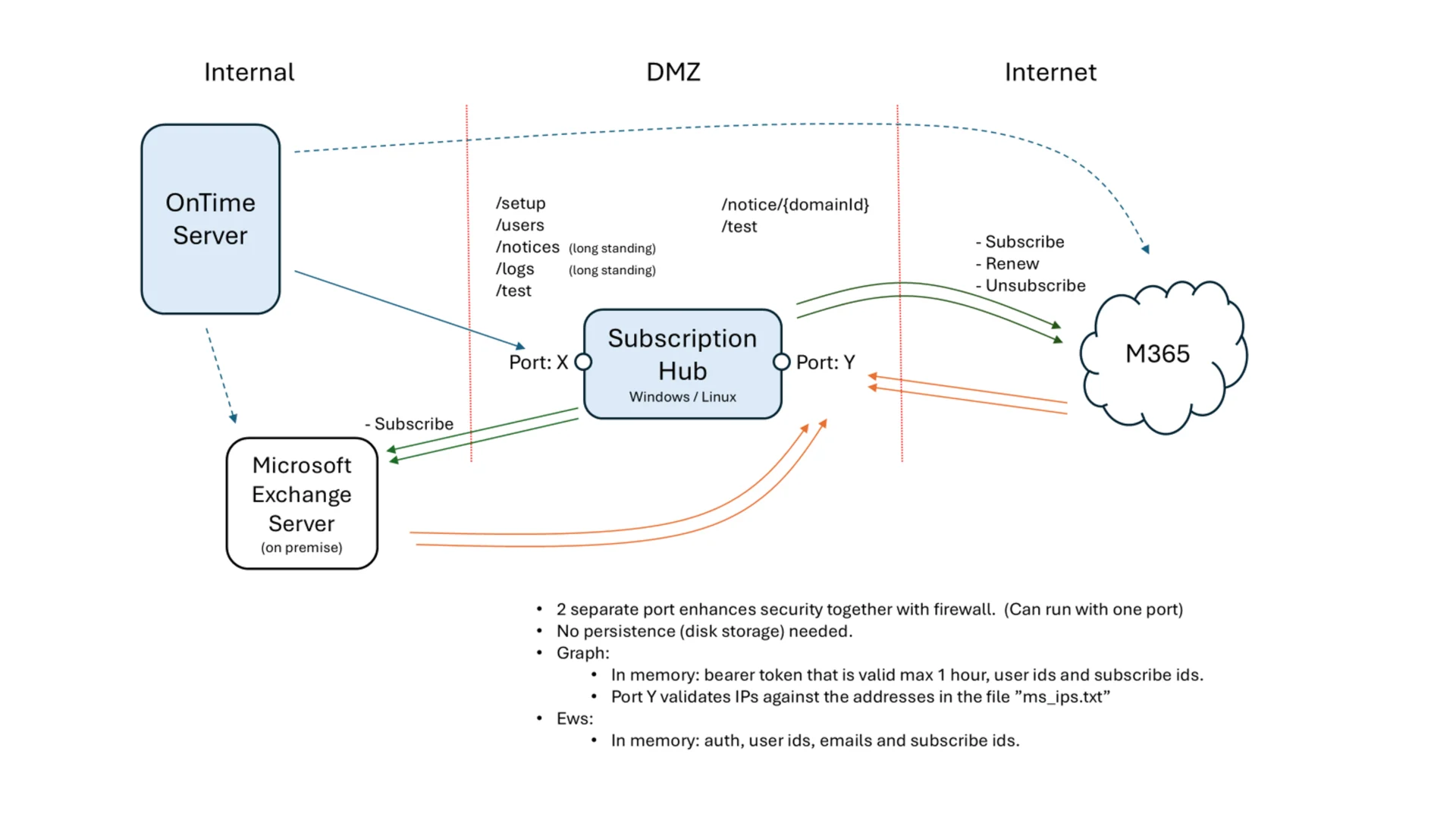
Microsoft Graph API provides a modern notification mechanism that has several advantages over EWS Streaming Subscriptions:

- Doesn't requires a persistent connection for each subscription
- Can handle many subscriptions efficiently with retry policies and batching.
- Supports subscription expiration and renewal, typically up to 60 minutes for high-security scenarios.

Subscription Hub is an HTTP-based callback API that receives change notifications from Microsoft Graph, handles subscriptions life-cycle and prepares needed data for OnTime Server.

While the EWS Streaming subscription method is still supported we encourage our user organisations to start switching to the OnTime Subscription Hub.

ONTIME DESKTOP
  • Event Creation Behavior: Creating an event now defaults to showing the event dialog and inviting the user, rather than directly creating the event on their calendar.
  • Group Panel Upgrade: Introduced a new group panel with search functionality and support for group aliases.
  • "Working Elsewhere" Status: Events marked as “Working elsewhere” no longer block time in the calendar.
ONTIME ADMIN
  • SubHub Configuration: Added SubHub configuration support.
  • Manual User Injection: Users can now be injected into OnTime individually, without requiring a full directory sync.
  • Dashboard Enhancements: Dashboard now shows the status of the Notice Hub.
OUTLOOK CATERING ADD-IN
  • Finalized the integration of the Outlook Catering add-in.
ONTIME BACKEND
  • Index Optimization: Improved indexes for the Event/List call to enhance performance.
  • Permissions Update: Replaced deprecated directory.read.all permission with a suitable alternative.
  • Logging Enhancements: Improved the trace logging for Microsoft Graph API calls.
  • SQL Blocking Reduction: Updated event handling to use insert-only operations, minimizing SQL blocking. Cleanup routines now:
    • Remove obsolete event copies
    • Delete events from removed users
    • Retain events marked as deleted for 3 weeks before final deletion

Bug Fixes

ONTIME DESKTOP
  • Repeat Events: An error was triggered when creating a repeating event longer than 24 hours. Events are now limited to 24 hours if repetition is enabled.
  • Pinned Events: Fixed an issue where the pinned event list did not update properly after adding a new event—previously, it only showed events based on the selected view date.
  • Unchanged Events Triggering Email: Fixed an issue where users received email notifications after saving or sending events without making changes, particularly for events with online meetings.
ONTIME ADMIN
  • License Display: Corrected an issue where license information incorrectly showed "no license" when the application was stopped.
ONTIME BACKEND
  • Catering Event Management: Fixed an issue that occurred when managing events with catering on behalf of other users.
Version 6.2.8
23. May, 2025
Welcome to the latest update. We've made several improvements, bug fixes, and addressed potential security vulnerabilities in this release. While we highlight key changes in these notes, please note that not all updates may be detailed here. It's a reflection of our ongoing commitment to enhance performance and user experience while ensuring the safety of your data. We recommend going through the information provided for a snapshot of the most pertinent changes.

Improvements

ONTIME BACKEND
  • Improved anti-blocking behavior in "OldUserCleanup". The process of removing outdated user information has been split into smaller steps, and a hard 10-minute time limit has been introduced to prevent potential long-term database blocking in high-load environments.


Bug Fixes

ONTIME DESKTOP
  • Fixed an issue where invitees received meeting update emails when only catering was added or changed—this occurred specifically when the meeting also included an online meeting link.
ONTIME MOBILE
  • Fixed an issue with the conflict check for room-only bookings, where conflicts were not being detected or handled correctly.
ONTIME BACKEND
  • Fixed an issue where field synchronization of meta data on rooms would fail if the system contained more than 999 rooms.
  • Fixed an issue where retrieving event details across multiple installments of OnTime was not functioning as expected.
  • Fixed an issue with EWS user synchronization that occurred when a user's email address contained "Aa".
Version 6.2.7
30. April, 2025
Welcome to the latest update. We've made several improvements, bug fixes, and addressed potential security vulnerabilities in this release. While we highlight key changes in these notes, please note that not all updates may be detailed here. It's a reflection of our ongoing commitment to enhance performance and user experience while ensuring the safety of your data. We recommend going through the information provided for a snapshot of the most pertinent changes.

Improvements

INSTALL & UPGRADE
  • Upgraded the underlying Tomcat server to version 10.1.40 to leverage the latest security and performance improvements.
Version 6.2.6
2. April, 2025
Welcome to the latest update. We've made several improvements, bug fixes, and addressed potential security vulnerabilities in this release. While we highlight key changes in these notes, please note that not all updates may be detailed here. It's a reflection of our ongoing commitment to enhance performance and user experience while ensuring the safety of your data. We recommend going through the information provided for a snapshot of the most pertinent changes.

Improvements

ONTIME DESKTOP
  • Fixed an issue where users lost keyboard shortcuts after deleting an event.

ONTIME BACKEND
  • Enhanced logging for group synchronization with the new Graph Directory Sync.

Bug Fixes

ONTIME DESKTOP
  • Fixed an issue where clicking the Teams Chat and Meet Now buttons in the business card did not open them in a new tab.
ONTIME MOBILE
  • Fixed a design issue affecting the display of multiple conflicts.

ONTIME BACKEND
  • Fixed a bug where excluded domain users were not removed correctly from the domain.
  • Fixed an issue where poll reminder emails were always sent in English instead of respecting the user's language settings.
  • Fixed an issue where reminder emails were sometimes sent even after polls were archived following a booking creation.
  • Fixed an issue where custom attributes were not synced correctly when using multiple domains.
Version 6.2.5
19. March, 2025
Welcome to the latest update. We've made several improvements, bug fixes, and addressed potential security vulnerabilities in this release. While we highlight key changes in these notes, please note that not all updates may be detailed here. It's a reflection of our ongoing commitment to enhance performance and user experience while ensuring the safety of your data. We recommend going through the information provided for a snapshot of the most pertinent changes.

Improvements

INSTALL & UPGRADE
  • Upgraded the underlying Tomcat server to version 10.1.39 to leverage the latest security and performance improvements.
Version 6.2.4
17. March, 2025
Welcome to the latest update. We've made several improvements, bug fixes, and addressed potential security vulnerabilities in this release. While we highlight key changes in these notes, please note that not all updates may be detailed here. It's a reflection of our ongoing commitment to enhance performance and user experience while ensuring the safety of your data. We recommend going through the information provided for a snapshot of the most pertinent changes.

Improvements

ONTIME DESKTOP
  • Updated MicrosoftTeams.min.js to version 2.9.1 for the Outlook plug-in. This ensures compatibility with the new Outlook experience, allowing the plug-in to function correctly.
ONTIME MOBILE
  • Updated the Mobile interface to render the description field as HTML and include attachments.

Bug Fixes

ONTIME DESKTOP
  • Fixed an issue related to the Author role. Users with this role can now double-click to create events and create events directly from a user's business card, similar to the Edit role.
ONTIME BACKEND
  • Fixed an issue with the creation of default Global settings. Previously, Global settings were hardcoded to default to Language/Region "en"/"en" at initialization. With this update, the initial Global settings will now inherit the Language/Region from the Default settings if they are configured in the Admin. If no Default settings are specified, the system will fall back to "en"/"en" as the default.
Version 6.2.3
10. March, 2025
Welcome to the latest update. We've made several improvements, bug fixes, and addressed potential security vulnerabilities in this release. While we highlight key changes in these notes, please note that not all updates may be detailed here. It's a reflection of our ongoing commitment to enhance performance and user experience while ensuring the safety of your data. We recommend going through the information provided for a snapshot of the most pertinent changes.

Improvements

ONTIME BACKEND
  • Added support for a new group type for rooms: RoomList. RoomList group types can now be used as a Source for Rooms and Shared Desks. Caution: RoomList cannot be included as part of other groups and must be used directly as a Source.

Bug Fixes

ONTIME BACKEND
  • Fixed a bug related to exploring internal groups. The functionality for retrieving all internal groups from the Source was implemented without paging attributes. As a result, only a portion of the group list was retrieved.
  • Improved trace logs for MS Graph calls. Added MS Graph responses for POST calls and butches. Added time of the log.
Version 6.2.0
31. January, 2025
Welcome to the latest update. We've made several improvements, bug fixes, and addressed potential security vulnerabilities in this release. While we highlight key changes in these notes, please note that not all updates may be detailed here. It's a reflection of our ongoing commitment to enhance performance and user experience while ensuring the safety of your data. We recommend going through the information provided for a snapshot of the most pertinent changes.

Improvements

ONTIME DESKTOP
  • We have made an improvement to how calendar invitations are handled. Previously, when opening an invitation, the ShowAs status would automatically change to "Busy." This behavior has been updated to preserve the original ShowAs value (e.g., Free, Tentative, Busy, Out of Office) when opening the invitation.
ONTIME ADMIN
  • Improved the search functionality for the startup group in the default settings and expanded the width of the result list to enhance readability, especially for groups with very long names.
  • Introduced a selection option allowing users to choose between "Graph Only Directory Sync" and the "Legacy Mix" sync mode, which combines EWS and Graph sync. This enhancement provides flexibility for directory synchronization configurations and supports diverse user requirements.
  • Loading Spinner for User Sync: We've added a loading spinner to enhance the user experience when syncing users from the User Member section. This visual indicator will appear while the system is processing the sync request, providing users with clear feedback that the action is in progress.
ONTIME BACKEND
  • Directory Synchronization has been recoded in MS Graph for organisations running MS 365: In larger OnTime environments, directory synchronization using Microsoft Exchange Web Services (EWS) has previously taken up an excessive amount of time. While we lately made improvements to the EWS code, it became clear that a more fundamental change was needed. In our 6.2 release, we transitioned directory and user group synchronization to Microsoft Graph. This has resulted in a significant performance boost, with a reduction of up to 70% in runtime. Additionally, the new implementation handles situations where Microsoft 365 throttles operations more effectively.
  • Implemented queue sync for synchronization jobs which prevents calling new sync jobs while other jobs are still is running.

Bug Fixes

ONTIME POLLARITY
  • Resolved an issue where users continued to receive reminders for archived polls.
  • Resolved an issue that would occur when a user creates a meeting invitation on the Pollarity page and later opens it in the Main View, line breaks in the Description field were missing.
  • The PIN code input field has been updated to improve usability. Previously, pasting a PIN code with spaces caused it to fail. The input field now accepts 7-digit PIN codes and automatically removes any spaces when pasted, ensuring seamless input and validation.
ONTIME CATERING
  • Resolved an issue where fees were not being added automatically as expected.
  • Resolved an issue where menu items would not display unless a serving time was defined. All menu items now appear correctly regardless of serving time configuration.
  • Resolved an issue where locations failed to load in the add-in when no rooms were added to the event.
ONTIME ADMIN
  • Resolved an issue where clearing or changing a user photo did not update in all tables.
  • Fixed an issue where extended attributes were not appearing in dynamic group selection boxes.
  • Resolved an issue with alternative sorting selections in dynamic group configurations.
ONTIME BACKEND
  • Corrected the time format for lastModified dates in API responses to ensure consistency and accuracy.
  • Resolved an issue where clearing or changing a user photo did not update in all tables.
Version 6.1.10
19. December, 2024
Welcome to the latest update. We've made several improvements, bug fixes, and addressed potential security vulnerabilities in this release. While we highlight key changes in these notes, please note that not all updates may be detailed here. It's a reflection of our ongoing commitment to enhance performance and user experience while ensuring the safety of your data. We recommend going through the information provided for a snapshot of the most pertinent changes.

Improvements

ONTIME VISITOR MANAGER
  • Introduced the ability to modify check-in and check-out dates/times. This enhancement allows guards and receptionists to log entries and exits at different times, providing greater flexibility and accuracy in managing visitor records.
  • Introduced confirmation boxes in the Visitor Manager for check-in and check-out actions.
  • Users can now set or adjust the check-in and check-out dates directly within the confirmation dialog. Ensures accurate visitor records and reduces errors during the check-in/out process.
  • Users can now perform filter-searches for custom text fields in the Visitor Manager.
ONTIME MS TEAMS / OUTLOOK ADD-INS
  • Combined the Outlook and Teams plugin folders into a single folder named teams-outlook-new-addin. This change aligns with Microsoft's updated plugin installation structure, consolidating plugins into a unified location.
  • Updated the descriptions of icons in the add-in for improved clarity and user experience.
  • Updated the add-in icon in the rail for a refreshed and consistent design.
ONTIME ADMIN
  • Administrators can now configure a startup group in the default settings. This allows the admin to define which group users will see when they access the application for the first time.
  • Renamed "Security User" to "Anchor EWS User" in the domain settings to provide greater clarity and avoid potential misunderstandings.
ONTIME BACKEND
  • Optimized EWS (Exchange Web Services) calls by ensuring unused HTTP connections are released, reducing resource consumption and improving performance.
  • Optimized the handling of event changes to enhance performance and responsiveness.
  • Upgraded Apache Tomcat to version 10.1.34

Bug Fixes

ONTIME DESKTOP
  • Resolved an issue where the company name field was not populated when selecting a known visitor from the list while adding them to a meeting.
  • Addressed a problem where attendees were sometimes not displayed on invitations when opened in full-view mode, even if the user had the correct credentials. This issue has now been resolved to ensure proper attendee visibility.
  • The "Show overlay" option in View Options has been removed, as it was non-functional and did not impact the interface.
ONTIME BACKEND
  • Resolved an issue where static groups were not functioning correctly when used with custom selection options.
  • Addressed an issue where attempting to open another person’s private event with delegate access would show wrong time zone when the event was in a different time zone.
  • Fixed an edge case that could result in a null pointer exception when retrieving events.
Version 6.1.9
19. November, 2024
Welcome to the latest update. We've made several improvements, bug fixes, and addressed potential security vulnerabilities in this release. While we highlight key changes in these notes, please note that not all updates may be detailed here. It's a reflection of our ongoing commitment to enhance performance and user experience while ensuring the safety of your data. We recommend going through the information provided for a snapshot of the most pertinent changes.

Improvements

ONTIME DESKTOP
  • Added a "Join Meeting" button on the event preview page for online meetings, providing quick access to virtual meetings directly from the event overview.
ONTIME ADMIN
  • Added a new feature that allows users to include the company name within the name format display options. This enhancement offers greater flexibility in personalizing name formats and ensures that company names are easily visible where needed.
  • New Default Sorting Options for Desktop Views: Added "Email" and "DisplayName" to the alternative sorting possibilities in the default settings for desktop views, providing users with enhanced flexibility in organizing and viewing data.
ONTIME BACKEND
  • In version 6.1.8a, multithreading was introduced for directory synchronization to significantly reduce execution time. This improvement was particularly aimed at addressing delays in larger installations where the synchronization task could take longer than desired to execute. Prior to the release of version 6.1.8a, extensive testing demonstrated substantial reductions in execution time. However, these tests did not reveal that in production environments using the Microsoft EWS API, the service would experience throttling under multithreading conditions.To address this, version 6.1.8b reduced the maximum number of threads from 10 to 2. Unfortunately, this adjustment did not fully resolve the throttling issue.For version 6.1.9, we initially planned to make the number of threads manually configurable. However, further testing showed that even with this flexibility, EWS throttling resulted in inconsistent performance improvements or even potentially increased execution times. As a result, we decided to limit version 6.1.9 to a single thread. While this configuration offers some improvement over version 6.1.7, it falls short of our original goal.We recognize that the throttling issues stem from limitations in the EWS API. To address this, we are actively working on replacing the EWS API with the more modern Microsoft Graph API. This update is expected to enable improved directory synchronization with support for multithreading. We plan to release a new version with these enhancements within this quarter.
    We sincerely apologize for any inconvenience this may have caused and appreciate your understanding as we work to deliver a more robust solution.
  • The event list endpoint was previously a heavy load on the system due to performance bottlenecks. For each user ID in a request, a separate database query retrieved events within a specified time range, causing high database load and memory usage due to multiple collections of event data. Additionally, complex queries with multiple joins and inner selects added to execution time, and post-query filtering was required for each user’s access level.To optimize this, permissions are now filtered upfront, creating two user lists: one for owner/author permissions and one for summary-only access. The query was split into lightweight and detailed versions based on permissions. Events are now retrieved for all user IDs in a single query, reducing database connections. Results are stored in a single collection to save memory and avoid data duplication.
  • Added additional logging information for directory sync for each successfully synchronized user.
  • Removed redundant log entries generated when the dashboard is left open, improving log clarity and reducing unnecessary data.

Bug Fixes

ONTIME DESKTOP
  • Resolved an issue where declining a meeting on behalf of another person in the Individual view did not function as expected.
  • Fixed an error that occurred when opening a private invitation in Individual view for a user with edit rights.
  • Fixed an issue where it appeared possible to change the date of a single instance within a recurring event series.
  • Fixed an issue where the main view would shift if the event list was pinned and the user attempted to open settings.
  • Resolved an issue where required/optional attendees were not displayed on double-click, even though they were visible in the details viewer.
  • Removed the option to change the "Calendar For" field on existing events, ensuring consistency and preventing unintended modifications.
  • Fixed an issue where the client would fail to create an event if a graph ID was not received from the backend.
  • Resolved an issue in the desktop version where the subject line of private calendar events was not visible to users with delegated access, despite appropriate permissions. Delegated users can now view the subject of private events as intended when access is granted.
ONTIME CATERING
  • Corrected the sorting order in the catering order list on the left panel.
  • Fixed a bug in the desktop that could occur when removing a room from the system if it was previously used in catering, preventing potential errors and enhancing system stability.
  • Fixed an error that occurred in Individual View when acting on behalf of another user and attempting to open a catering order for that user.
ONTIME BACKEND
  • Rolled back the permission synchronization code to the version used in 6.1.7 which was considerably faster than the one used in 6.1.8a and 6.1.8b.


Version 6.1.8b
31. October, 2024
Welcome to the latest update. We've made several improvements, bug fixes, and addressed potential security vulnerabilities in this release. While we highlight key changes in these notes, please note that not all updates may be detailed here. It's a reflection of our ongoing commitment to enhance performance and user experience while ensuring the safety of your data. We recommend going through the information provided for a snapshot of the most pertinent changes.

Improvements

ONTIME BACKEND
  • This release addresses an issue reported on Tuesday, October 29, 2024. We received multiple support requests from customers experiencing synchronization issues affecting some or all users. Our investigation traced the problem to a change in Microsoft’s Exchange Web Services (EWS) API, which no longer returns the expected “IsCancelled” parameter for events. The issue in the OnTime log will show up as "This property was requested, but it wasn't returned by the server".
    In version 6.1.8b, we’ve implemented a workaround that assumes the “IsCancelled” value is false if not received from the EWS API. This adjustment is relevant for organizations using the OnTime API, but it does not affect the general OnTime desktop UI.
  • Additionally, due to heavy throttling of the EWS API in the directory sync process with version 6.1.8a—particularly in Japan—we’ve reduced the maximum number of threads from 10 to 2. In a future update, this number will be dynamically adjustable to mitigate throttling, and the maximum number of threads will be configurable.
Version 6.1.8a
14. October, 2024
Welcome to the latest update. We've made several improvements, bug fixes, and addressed potential security vulnerabilities in this release. While we highlight key changes in these notes, please note that not all updates may be detailed here. It's a reflection of our ongoing commitment to enhance performance and user experience while ensuring the safety of your data. We recommend going through the information provided for a snapshot of the most pertinent changes.

Improvements

ONTIME DESKTOP
  • The order panel design has been updated to display more relevant order information. Additionally, participants have been added as an editable field in the order form.
ONTIME CATERING
  • Payable Actions Realignment:
    "Payable" Actions: Users can now offer order adjustments (edit) and then save the order, moving it to the Billing status.
    "Non-payable" Actions: Users can now directly move an order to the Cancelled status.
  • Several improvements have been made to the print process. As a result, the "Print Picklist" option has been removed, and its functionality has been reorganized under the new print logic.
  • The participant count is now an editable field. Initially, the default value is set to the number of participants for the meeting, but the user can modify this as needed.
ONTIME ADMIN
  • Tomcat Heap Memory Limit Increase. The Tomcat Heap memory settings have been updated, increasing the maximum allowable memory from 10GB to 32GB. This change provides greater flexibility and improved performance for environments requiring larger memory allocations.
  • New Feature: Performance Settings in Global Backend A new Performance section has been added to the Global Backend Settings, allowing administrators to adjust the minimum and maximum connection pool sizes. This feature provides greater control over backend performance, enabling fine-tuning for optimal system resource management.
  • Tomcat version upgraded to 10.1.31
ONTIME BACKEND
  • The code for both Directory Synchronization and User/Group Synchronization has been rewritten to support multithreading. Tests have shown a reduction in run time of about 50%.
  • The connection pool between the Tomcat server and the SQL server is now configurable to better leverage high-spec hardware in deployments with large user numbers. This enhancement helps prevent the dynamically allocated pool size, as seen in previous versions, from growing to levels that could impact the overall performance of OnTime. Default settings specify a minimum of 10 and a maximum of 20 connections. For larger systems, we currently recommend increasing the maximum by 2 for every additional 1,000 users, up to a maximum value of 60. Please note that any changes to these settings will require a restart of the OnTime application for the changes to take effect.
  • Added index for improved handling of temporary events.

Bug Fixes

ONTIME DESKTOP
  • Resolved an issue where changing a private group to a shared group would incorrectly remove it from "My Groups."
  • Events with catering orders will now display in the event details when single-clicking on the event, provided the user has permission to view full details.
  • Fixed an issue causing errors when opening accepted events sent from external mail systems like Google Calendar. This update resolves the problem where accepted events from external sources could not be opened without triggering an error.
  • Fixed an issue that could cause an error in the weekly planner view when an event was created for a user not visible in the current view.
  • Fixed an issue that prevented users from dragging their own private events in the viewer.
  • Fixed an issue with sending emails to multiple recipients from the view, where the final email appeared empty. This resolves a problem where the last email in a batch sent from the view was missing content.
  • Fixed an issue with updating the "Show As" status on time off requests. This resolves a problem where users were unable to modify the "Show As" field when submitting or editing time off requests.
  • Fixed List Viewer Group Selection Reset We have resolved an issue in the List Viewer, where the group selection would unexpectedly reset to the user's pre-configured startup group after creating or updating an event. This fix ensures that the group selection remains as intended, preserving the current selection instead of reverting to the startup group setting.
  • Notice panel now sorts correctly. This update resolves previous sorting issues, ensuring that notices are displayed in the correct order.
  • Renaming: The fields "Office" and "Location" have been renamed to "Office Location" in both the Admin and Desktop clients for consistency.
  • Resolved an issue where sorting the business card was not functioning correctly.
ONTIME CATERING
  • Fixed an issue where single orders without meetings, created from the desktop, could not be edited.
ONTIME MOBILE
  • When exiting any type of event the item list is now left open. In previous version the result varied by type.
ONTIME ADMIN
  • Fixed an issue where if the admin client was left open, it would place unnecessary load on both the Tomcat server and the SQL .
ONTIME BACKEND
  • In deployments with user counts around 10,000, some instances of high CPU and SQL server usage have been reported, leading to temporary performance issues before the server recovered. In version 6.1.8, several stability-focused fixes have been implemented to address and prevent these situations, ensuring smoother performance in large-scale environments.
  • As part of the improvements for the directory and User / Group sync we fixed scenarios where the User/Group sync could stop with an exception for a domain.
Version 6.1.7
5. September, 2024
Welcome to the latest update. We've made several improvements, bug fixes, and addressed potential security vulnerabilities in this release. While we highlight key changes in these notes, please note that not all updates may be detailed here. It's a reflection of our ongoing commitment to enhance performance and user experience while ensuring the safety of your data. We recommend going through the information provided for a snapshot of the most pertinent changes.

Improvements

ONTIME DESKTOP
  • Optimized Event Creation and Editing: Improved the performance of event creation and editing by reducing the number of API calls. This optimization results in a more efficient and faster user experience when managing events.
ONTIME MOBILE
  • Fixed an issue with the conflict detection mechanism when scheduling events. The conflict check now accurately identifies overlapping events, ensuring that scheduling conflicts are correctly handled.

Bug Fixes

ONTIME DESKTOP
  • Resolved an issue where multiple unnecessary API calls were being triggered during event creation. This fix reduces server load and enhances overall application performance.
  • Significantly enhanced the speed of searching for resources during event creation. Users will now experience faster and more responsive search results especially if there are significant quantities of rooms or equipment.
ONTIME MOBILE
  • Fixed an issue where most icons were unresponsive to user interactions. All icons now function as expected.
  • Resolved an issue where the selected number on the "+" icon was not resetting when switching groups.


Version 6.1.6
30. August, 2024
Welcome to the latest update. We've made several improvements, bug fixes, and addressed potential security vulnerabilities in this release. While we highlight key changes in these notes, please note that not all updates may be detailed here. It's a reflection of our ongoing commitment to enhance performance and user experience while ensuring the safety of your data. We recommend going through the information provided for a snapshot of the most pertinent changes.

Bug Fixes

ONTIME DESKTOP
  • Addressed an issue that allowed users to copy polls from an existing calendar entry even if the user did not have access to polls or Pollarity as an option.
ONTIME VISITOR
  • Fixed a significant performance degradation that occurred when adding new visitors. This issue affected both the OnTime desktop application and the Visitor Manager interface.
ONTIME BACKEND
  • Resolved an issue where an OnTime service on the Windows server was installed with an unquoted service path. This was identified as a potential security risk by a scanning tool.


Version 6.1.5
20. August, 2024
Welcome to the latest update. We've made several improvements, bug fixes, and addressed potential security vulnerabilities in this release. While we highlight key changes in these notes, please note that not all updates may be detailed here. It's a reflection of our ongoing commitment to enhance performance and user experience while ensuring the safety of your data. We recommend going through the information provided for a snapshot of the most pertinent changes.

Bug Fixes

ONTIME BACKEND
  • We have resolved an issue that caused server performance to degrade during events and when making user list calls. If you notice that your server's CPU usage spikes unexpectedly we recommend upgrading to this version to address the issue.
Version 6.1.4
5. July, 2024
Welcome to the latest update. We've made several improvements, bug fixes, and addressed potential security vulnerabilities in this release. While we highlight key changes in these notes, please note that not all updates may be detailed here. It's a reflection of our ongoing commitment to enhance performance and user experience while ensuring the safety of your data. We recommend going through the information provided for a snapshot of the most pertinent changes.

Improvements

ONTIME BACKEND
  • Upgraded Tomcat to version 10.1.25.

Bug Fixes

ONTIME DESKTOP
  • Fixed an issue where the meeting type was returned as "Meeting" instead of "Appointment" for repeated events even if there were no invitees.
  • Fixed that the description information was hidden for entries that the user had been granted "Full entry details" permission or higher for.
Version 6.1.3
27. June, 2024
Welcome to the latest update. We've made several improvements, bug fixes, and addressed potential security vulnerabilities in this release. While we highlight key changes in these notes, please note that not all updates may be detailed here. It's a reflection of our ongoing commitment to enhance performance and user experience while ensuring the safety of your data. We recommend going through the information provided for a snapshot of the most pertinent changes.

Improvements

ONTIME DESKTOP
  • Changed export from list view to contain chair and chair email. Removed rooms and resources.

ONTIME GENERAL
  • Upgraded JDK to Temurin-21.0.3.

Bug Fixes

ONTIME DESKTOP
  • Fixed an issue where invitees could not see status for invitees when an invitation was opened in the preview panel.
  • Updated the language files for the catering module to newest version.
ONTIME MOBILE
  • Fixed an issue that would occur when adding online meeting to an event. In this case, mobile would show extra HTML in the body field. This was due to URL sanitization introduced in version 6.0.
ONTIME BACKEND
  • Fixed an edge case scenario where custom attributes could not be read into OnTime. Not a general scenario.
  • Fixed an issue for Directory/User where the Graph API returned "Bad request" for special symbols such as Japanese characters.
Version 6.1.2
6. June, 2024
Welcome to the latest update. We've made several improvements, bug fixes, and addressed potential security vulnerabilities in this release. While we highlight key changes in these notes, please note that not all updates may be detailed here. It's a reflection of our ongoing commitment to enhance performance and user experience while ensuring the safety of your data. We recommend going through the information provided for a snapshot of the most pertinent changes.

Improvements

ONTIME BACKEND
  • Upgraded Tomcat to version 10.1.24.

Bug Fixes

ONTIME DESKTOP
  • Bug Fix: Resolved an issue where opening an accepted invitation event on behalf of another person could sometimes result in an error.
  • Bug Fix: Resolved an issue where opening an event with catering information incorrectly indicated that the meeting time had changed, even though it had not.
  • Bug Fix: Resolved an issue where the reminder time would incorrectly change from "Never" to "0 Minutes".
ONTIME POLLARITY
  • Bug Fix: Resolved an issue where copying an email address in the format "name <email>" into a Pollarity member could cause an error when saving.
ONTIME VISITOR
  • Bug Fix: Resolved an issue that prevented users from editing events with visitors added on behalf of other users.
ONTIME BACKEND
  • Bug Fix: Fixed an issue with updating information on accepted recurring invitations. The option to change the information for the entire series has been disabled, as this is not supported by Microsoft.
Version 6.1.1
16. April, 2024
Welcome to the latest update. We've made several improvements, bug fixes, and addressed potential security vulnerabilities in this release. While we highlight key changes in these notes, please note that not all updates may be detailed here. It's a reflection of our ongoing commitment to enhance performance and user experience while ensuring the safety of your data. We recommend going through the information provided for a snapshot of the most pertinent changes.

Improvements

ONTIME ADMIN CLIENT
  • Implemented a 'Delete All' feature for Pollarity Members.

Bug Fixes

ONTIME DESKTOP
  • Addressed an issue causing issues in dragging events within the viewer when associated with the previous Outlook design.
  • Fixed a display issue where the office phone number on the business card was not shown correctly.
  • Resolved a search issue for Exchange Directory members that occurred when selecting the search results.
  • Corrected the name format display in search results when Extension Attributes are in use.
  • Eliminated the possibility of double-booking equipment.
  • Addressed a problem where event reminders were not retaining the set times.
  • Enhanced room listings to always include 'Organizer' and 'Created by' information for better clarity.
ONTIME MOBILE
  • Fixed a bug on mobile devices where event times changed by an approver prior to approval were not being updated correctly.
ONTIME ADMIN CLIENT
  • Resolved a discrepancy issue where the Room display count was off the allowed number of rooms by one room.
  • Corrected a problem where setting Viewer Show Hours to '0' in default settings was non-functional.
ONTIME BACKEND
  • Addressed an issue causing issues in dragging events within the viewer when associated with the previous Outlook design.
Version 6.1.0
5. March, 2024
Welcome to the latest update. We've made several improvements, bug fixes, and addressed potential security vulnerabilities in this release. While we highlight key changes in these notes, please note that not all updates may be detailed here. It's a reflection of our ongoing commitment to enhance performance and user experience while ensuring the safety of your data. We recommend going through the information provided for a snapshot of the most pertinent changes.

Improvements

ONTIME DESKTOP
  • Improved the user interface for selecting users in the create Group and edit User list window, making it easier to see which users are selected
ONTIME MOBILE
  • A new Mobile version is available, introducing the ability to accept and decline notices.
ONTIME ADMIN CLIENT
  • Enhanced loading speed for user data within the admin client.
  • Introduced an Advanced Name Format option in the Admin UI for customized name formatting.
  • New domain configurations will now default to Client Credentials, moving away from the Legacy Method.
ONTIME BACKEND
  • Loading speed of users in the admin client has been further improved.
  • Updated Tomcat to version 10.1.18, ensuring improved stability and performance.
  • Addressed a potential issue related to users with PDF add-ons in their browsers.

Bug Fixes

ONTIME DESKTOP
  • Fixed discrepancies in how private events are opened in panel and expanded modes.
  • Addressed minor UI issues regarding incorrect information display for all-day event invitations.
  • Resolved inconsistencies in opening invitations/notices from the notice panel and viewer.
  • Corrected issues with event loading in the weekly planner for groups with only one member.
  • Fixed problems with opening polls that have been deleted or archived, ensuring error messages are displayed appropriately.
  • Resolved issues with opening shared desk appointments with read access, private Time Off events disclosure, and the "Clear all" button in list view search not resetting the search time span to default value.
  • Addressed an issue where opening an item from the openitem URL would open the item as a shared desk event.
  • Fixed a problem with booking events from a poll where placeholder events are configured to use "Show As" to something other than "Free".
  • Corrected issues with conflict checks on all-day events, external users opening a deleted poll, displaying categories in detailed event viewer, and using custom help links in default settings.
  • Improved the weekly planner functionality where selecting not to see one's own calendar on top would not update the calendar info until scrolling started.
  • Reintroduced the viewstart URL parameter that was omitted by mistake in the 6.0.x series.
ONTIME POLLARITY
  • Addressed an issue with opening a deleted poll externally, where it would ask for an access code even though the poll is unavailable.
ONTIME BACKEND
  • Resolved an issue where private Time Off events revealed excessive information.
  • Addressed a problem where temporary events lacked Location and Categories immediately after creation, and an issue that could occur if a user attempted to delete an event before it was synchronized.
  • Fixed a bug with the Pollarity Reminder link.

Improvements, bug fixes, and addressing security vulnerabilities

The versions listed includes both improvements, bug fixes, and addressed potential security vulnerabilities. While we highlight key changes in these notes, please note that not all updates may be detailed here. It’s a reflection of our ongoing commitment to enhance performance and user experience while ensuring the safety of your data. We recommend going through the information provided for a snapshot of the most pertinent changes.

Version 11.8.1
7. November, 2025
Welcome to the latest update. We've made several improvements, bug fixes, and addressed potential security vulnerabilities in this release. While we highlight key changes in these notes, please note that not all updates may be detailed here. It's a reflection of our ongoing commitment to enhance performance and user experience while ensuring the safety of your data. We recommend going through the information provided for a snapshot of the most pertinent changes.

Bug Fixes

DESKTOP
  • Fixed: In the Weekly Planner view, events were not refreshed when switching to a new week if the same weekday in that week contained no events.
EXCHANGE SERVLET
  • Fixed: Deleting an Exchange user from the configuration no longer triggers errors in the Exchange Servlet backend for certain tasks.
    Fixed: The placeholder document link in Pollarity no longer contains an incorrect "null" value in the URL for Exchange users.
Version 11.8.0
28. October, 2025
Welcome to the latest update. We've made several improvements, bug fixes, and addressed potential security vulnerabilities in this release. While we highlight key changes in these notes, please note that not all updates may be detailed here. It's a reflection of our ongoing commitment to enhance performance and user experience while ensuring the safety of your data. We recommend going through the information provided for a snapshot of the most pertinent changes.

Improvements

DESKTOP
  • All calendar events are now displayed with a minimum height of 2 pixels to improve visibility and ensure that even very short events are visually noticeable.
  • In hierarchical name structures, groups with blank names are now automatically replaced by “-” to ensure proper display and consistency.
MOBILE
  • A new menu called “Rooms” in the lower navigation bar allows users to easily manage room reservations. The new “Rooms” menu includes lists of currently available rooms, ability to only show available rooms, filter the list by criteria’s such as Location, Building, Floor or Capacity
  • New room reservations can easily be created and for rooms that are licensed for “OnTime Room Display” you can even easily extend or release the currently ongoing event. These new features emphasize one of the main objectives of OnTime Room Display which is to increase the utilisation of meetings rooms and make sure that unused meeting rooms are made available for new bookings.
  • It is now possible for the OnTime administrator to configure which icons appear — and in what order — in the lower navigation menu on OnTime Mobile devices.
MAIN SERVLET
  • The cache of Exchange Domains is now updated every minute. In previous versions, Exchange domain information was read on demand and not refreshed. This data was also echoed onto the user, meaning that changes to the domain configuration did not update how the backend connected to the server—unless the servlet was restarted.

Bug Fixes

DESKTOP
  • Fixed an issue where opening OnTime in Weekly Planner view caused an error if a non-main Legends Set was selected.
  • When opening an accepted invitation containing an online meeting via a single click and saving, the online meeting information was incorrectly removed.
  • Fixed an issue where having groups with similar names — for example, "test\test" and "test" — could result in only "test\test" being displayed.
  • When in Show Selected mode, deselecting the last selected item did not return to Show All view.
EVENT HUB
  • Fixed an issue in EventHub where “Repeat weekly” incorrectly interpreted selected weekdays, resulting in wrong occurrences being created in the person’s calendar.
  • Fixed an issue in EventHub where user searches incorrectly included Exchange users, even though only Domino users are currently supported.
  • Fixed an issue in EventHub where using “Repeat to end on given date” did not create the corresponding events in the personal calendar.
MAIN SERVLET
  • Fixed an issue where reading images from URL or Connections did not include the required authentication (user ID and password).
  • The Init Domino HTTP process now trusts all certificates to prevent TLS-related errors during initialization.
EXCHANGE SERVLET
  • The Wait Domino HTTP process now trusts all certificates to prevent TLS-related errors during connection.
  • Fixed an issue where Exchange Permissions retrieval would completely fail if a single user lookup failed. The process now skips the failing user and continues retrieving permissions for the remaining users.
  • Fixed an issue where newly added users were not granted permissions or automatically subscribed when an Exchange group changed. This occurred only if the servlet or its threads were not restarted (for example, by saving the Server or Domain document)
Version 11.7.2
10. July, 2025
Welcome to the latest update. We've made several improvements, bug fixes, and addressed potential security vulnerabilities in this release. While we highlight key changes in these notes, please note that not all updates may be detailed here. It's a reflection of our ongoing commitment to enhance performance and user experience while ensuring the safety of your data. We recommend going through the information provided for a snapshot of the most pertinent changes.

Improvements

DESKTOP
  • Added text wrapping support for comments in Share My Time requests, ensuring full visibility of longer text entries.
MAIN SERVLET
  • Events pushed via Event Hub are now marked as "No Edit," preventing modifications from within the OnTime client. This ensures consistency and preserves the integrity of centrally managed events.

Bug Fixes

EVENTS
  • Users with Reader access were able to drag and create new events and use the "Add me to Event" option.
MAIN SERVLET
  • Deleting a pushed Event Hub event from the desktop calendar could prevent the event from being re-created during subsequent Event Hub syncs. This issue has now been corrected.
  • Previously, if a pushed event was later modified, the changes were not reflected in users' calendars during the Event Hub sync. This issue has now been resolved, ensuring updates to pushed events are correctly synchronized.
  • The Event Hub limitation using Include and Exclude for event push was not active in previous versions.
Version 11.7.1
17. June, 2025
Welcome to the latest update. We've made several improvements, bug fixes, and addressed potential security vulnerabilities in this release. While we highlight key changes in these notes, please note that not all updates may be detailed here. It's a reflection of our ongoing commitment to enhance performance and user experience while ensuring the safety of your data. We recommend going through the information provided for a snapshot of the most pertinent changes.

Improvements

Hybrid Installations: Transitioning from EWS to Microsoft Graph

In many hybrid environments, it's common to include both Domino and Exchange users in the OnTime for Domino solution. Until now, OnTime has relied on the Exchange Web Services (EWS) API to support both Microsoft 365 and on-premises Exchange environments.

As Microsoft has announced the deprecation of EWS for Microsoft 365, we have re-engineered our Microsoft integration to fully support the Microsoft Graph API for M365 cloud environments. While the EWS-based integration remains available, we strongly recommend migrating to the Graph-based setup for enhanced capabilities and long-term compatibility.

The switch between EWS and Graph is handled through the configuration database. Although some setup is required, both options use the same codebase. Detailed guidance is available in the OnTime manual.

Microsoft Graph is now the preferred integration. It offers a modern REST-based architecture, improved security, and a more granular permissions model compared to EWS.
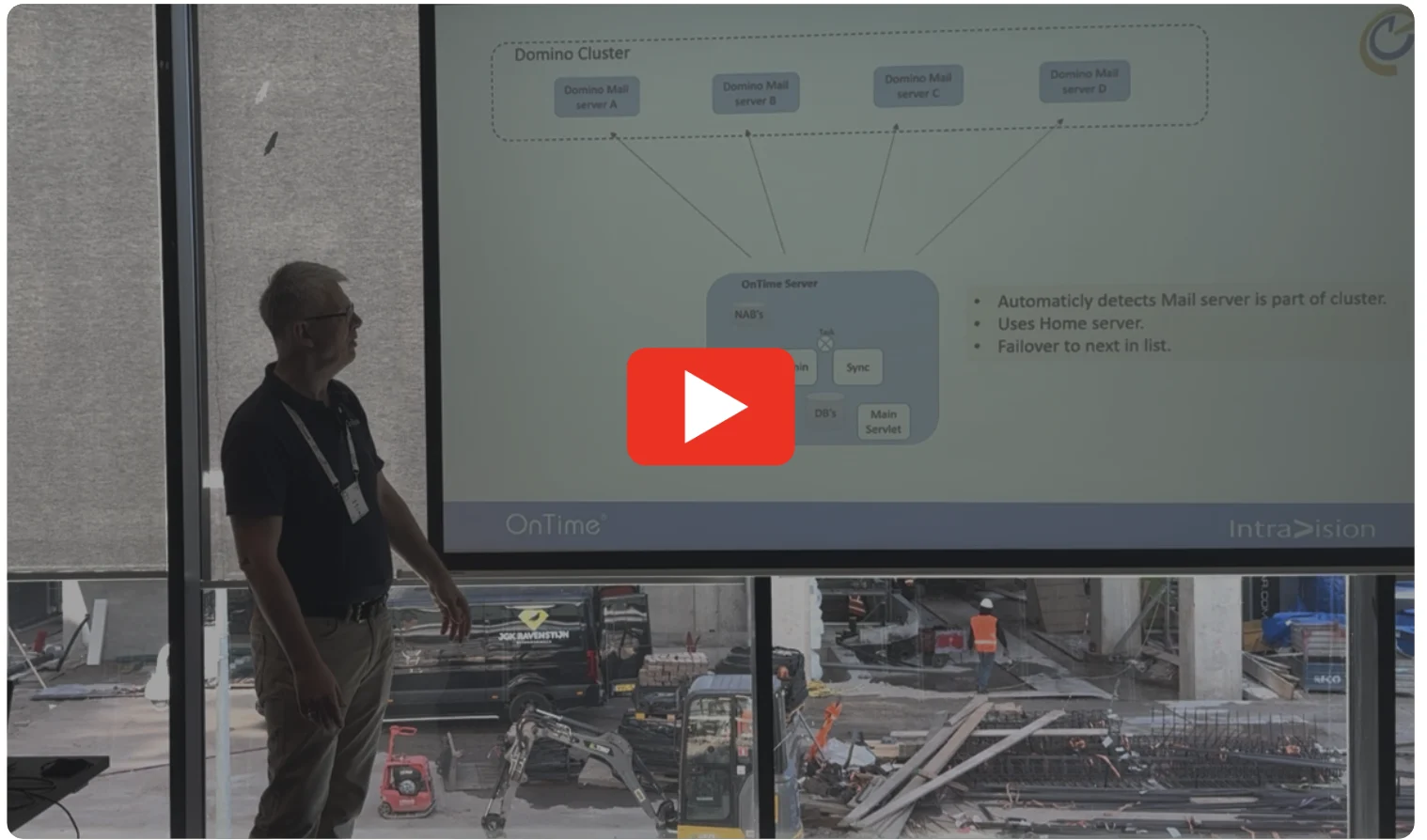
 

Scalable and Resilient Hybrid Topology with OnTime 11.7.x

At the recent ENGAGE conference, we hosted a session titled “Unlocking the Full Potential of OnTime: The Admin's Deep Dive Masterclass.”

This session highlighted advanced features and deployment topologies available in OnTime 11.7.x. We encourage you to watch the recording, as it covers several powerful features that are often underutilized.

If you're specifically interested in the hybrid setup, you can jump to the relevant section starting at the 21-minute mark of the presentation.
DESKTOP
  • PDF printing now handled directly in desktop code, no longer using backend API.
  • Business Card:
    • Calendar icon now creates a meeting and invites the user.
    • Hiding phone/mobile/email also hides corresponding action icons.
  •  Added Out of Office support for Exchange users.
  • Support for Automated Replies in hybrid environments (Domino + Microsoft) and on behalf of scenarios.
MAIN SERVLET
  • Exchange permissions now support "View Schedule Information" (busytime) via both EWS and Graph.
  • Added new log options when Debug is enabled.
  • Nightly Cleanup:
    • Now removes all Conflict documents.
    • Now removes API Docs in the client database not updated in 1 month.
EXCHANGE SERVLET
  • Exchange permissions now support "View Schedule Information" (busytime) via both EWS and Graph.
  • Added new log options when Debug is enabled.
  • New global setting to configure when the servlet runs Admin jobs.
  • Added support for Graph Room Lists.
  • New global option to run Admin Process on selected weekdays.
CONFIG
  • Default Exchange Domain type changed from "ews" to "graph".
  • Default protocol for External Server documents changed from "http" to "https".
  • New global config option to run Exchange Admin Process on selected weekdays.

Bug Fixes

DESKTOP
  • Resolved issue where email addresses inside quotes with commas/semicolons could not be pasted.
  • Resolved error for users without ShareMyTime access when accessing OnTime.
MOBILE
  • Making a room only booking which results in a conflict should not show conflicts on Chair
CONNECTIONS
  • Fixed error when opening OnTime from Communities and Profiles sidebars.
MAIN SERVLET
  • Fixed issue reading Encrypted text field.
  • Fixed: Approved TimeOff requests with "All Days" now correctly use 04:00 instead of 00:00.
  • Fixed: Events now display correctly on Domino Linux.
INSTALLER
  • Fixed file casing issue—"eventhub.ntf" was misnamed as "EventCal.ntf" on Linux systems.
Version 11.5.3
2. March, 2025
Welcome to the latest update. We've made several improvements, bug fixes, and addressed potential security vulnerabilities in this release. While we highlight key changes in these notes, please note that not all updates may be detailed here. It's a reflection of our ongoing commitment to enhance performance and user experience while ensuring the safety of your data. We recommend going through the information provided for a snapshot of the most pertinent changes.

Improvements

DESKTOP
  • Enabled support for pasting comma-separated email lists into the Required, Optional and FYI fields.
  • Made text values selectable for copying when previewing an event and in various parts of the desktop UI.
  • Introduced a revamped design for the Out of Office Page.
MOBILE
  • Updated the Mobile interface to render the description field as HTML and include attachments.

Bug Fixes

DESKTOP
  • Fixed an issue where copying a Poll to a new Poll did not copy the "Email Language" setting.
  • Fixed an issue where inviting on a Poll did not copy the Description into the Body.
  • Updated behavior so that when opening an individual user without Editor access, the Notice panel is now hidden instead of appearing empty.
  • Fixed an issue where starting via URL worked correctly, but switching to Day view resulted in the wrong user being selected.
  • Resolved an issue for added Zoom meetings where the Join button would either disappear or link to the wrong meeting, depending on whether the invitation was accepted from OnTime or Notes.
MAIN SERVLET
  • Fixed an issue where a repeated invitation sent from iNotes and accepted in OnTime caused calendar entries to be missing from the Notes Calendar interface, even though they appeared in OnTime.


Version 11.5.2
16. December, 2024
Welcome to the latest update. We've made several improvements, bug fixes, and addressed potential security vulnerabilities in this release. While we highlight key changes in these notes, please note that not all updates may be detailed here. It's a reflection of our ongoing commitment to enhance performance and user experience while ensuring the safety of your data. We recommend going through the information provided for a snapshot of the most pertinent changes.

Improvements

DESKTOP
  • If no startup group is configured (i.e., the group that OnTime should open to upon startup) or if the configured startup group has been deleted, OnTime will default to the first Private/Favourite group. This means the application will open the first group marked as either "Private" or "Favourite" in your list.
  • If the user has chosen the option to start OnTime in the "Last Selected Group", but that group was set to "-Show All-" (meaning it displays all groups or items), and now this option ("-Show All-") has been disabled in the default settings, OnTime will fall back to the first Private/Favourite group instead.

Bug Fixes

DESKTOP
  • Fixed issue with HCL Connections launching maximized.
  • Resolved conflict checking issue for hybrid MS Exchange users when moving entries, which mistakenly included the current timeslot.
  • Fixed display issue for events longer than 24 hours created in OnTime, which were not shown correctly in Notes.
  • Corrected saving of global settings under user settings, which was happening incorrectly.
  • Addressed issue for hybrid Exchange users where changes to optional invitees on existing events were ignored, and the invitees were not notified.
  • Resolved problem preventing message sending ("To all invitees," "To invitees who have responded," "To invitees who have not responded") for users with editor access to someone else's calendar.
  • Fixed issue with the user pick list for group additions, which improperly included users the user did not have access to.
  • Resolved issue for Exchange users unable to search OnTime users in the Required or Optional fields, while searches in other directories worked as expected.


Version 11.5.1
22. October, 2024
Welcome to the latest update. We've made several improvements, bug fixes, and addressed potential security vulnerabilities in this release. While we highlight key changes in these notes, please note that not all updates may be detailed here. It's a reflection of our ongoing commitment to enhance performance and user experience while ensuring the safety of your data. We recommend going through the information provided for a snapshot of the most pertinent changes.

Improvements

DESKTOP
  • The Exchange Permissions for Hybrid users now support "View Schedule Information" in addition to "Create, Edit, and Delete entries" and "Read entry details.
  • When individual mode is selected, the name of the currently selected OnTime user now appears in the horizontal navigation bar. This is useful when the user selection area is not in focus.
CONFIG
  • The Exchange Permissions for Hybrid users now support "View Schedule Information" in addition to "Create, Edit, and Delete entries" and "Read entry details.
EXCHANGE SERVLET
  • The Exchange Permissions for Hybrid users now support "View Schedule Information" in addition to "Create, Edit, and Delete entries" and "Read entry details.

Bug Fixes

DESKTOP
  • Fixed an issue where a single day vacation request initially appeared as two day requests.
  • Fixed an issue where, if user preferences were set to "Last Group" and "-Show all" was selected, the application failed to load all users during startup.
CONNECTIONS
  • Fixed an issue where it was not possible to remove a profile image from Connections.
CONFIG
  • Fixed an issue where "Reserved For" was not visible in Global Settings when permissions were set to "View Schedule Only."


Version 11.5.0
6. September, 2024
Welcome to the latest update. We've made several improvements, bug fixes, and addressed potential security vulnerabilities in this release. While we highlight key changes in these notes, please note that not all updates may be detailed here. It's a reflection of our ongoing commitment to enhance performance and user experience while ensuring the safety of your data. We recommend going through the information provided for a snapshot of the most pertinent changes.

Improvements

Introducing OnTime Event Hub

Your New Go-To for Seamless Event Management

We’re excited to announce the arrival of the Event Hub in OnTime for Domino 11.5.0, a powerful new feature. The Event Hub is designed to simplify the way your organization handles corporate events, national holidays, trade shows, or any other events that you need to broadcast across your users' calendars.

With the Event Hub, you can effortlessly create, broadcast, and maintain events, ensuring that everyone in your organization stays informed and up-to-date. This highly flexible feature adapts to your specific needs, making it an essential tool for managing events in your daily work life.

To help you get started, we’ve included a video that showcases just a few of the many ways your organization can leverage the Event Hub.

Best of all, the Event Hub is included with your existing OnTime Core license, meaning all organizations with current OnTime for Domino maintenance can start using it right away—at no additional cost. If you have not gone Premium but are using the Freemium 2 license then most of the features in the new Event is included there as well.
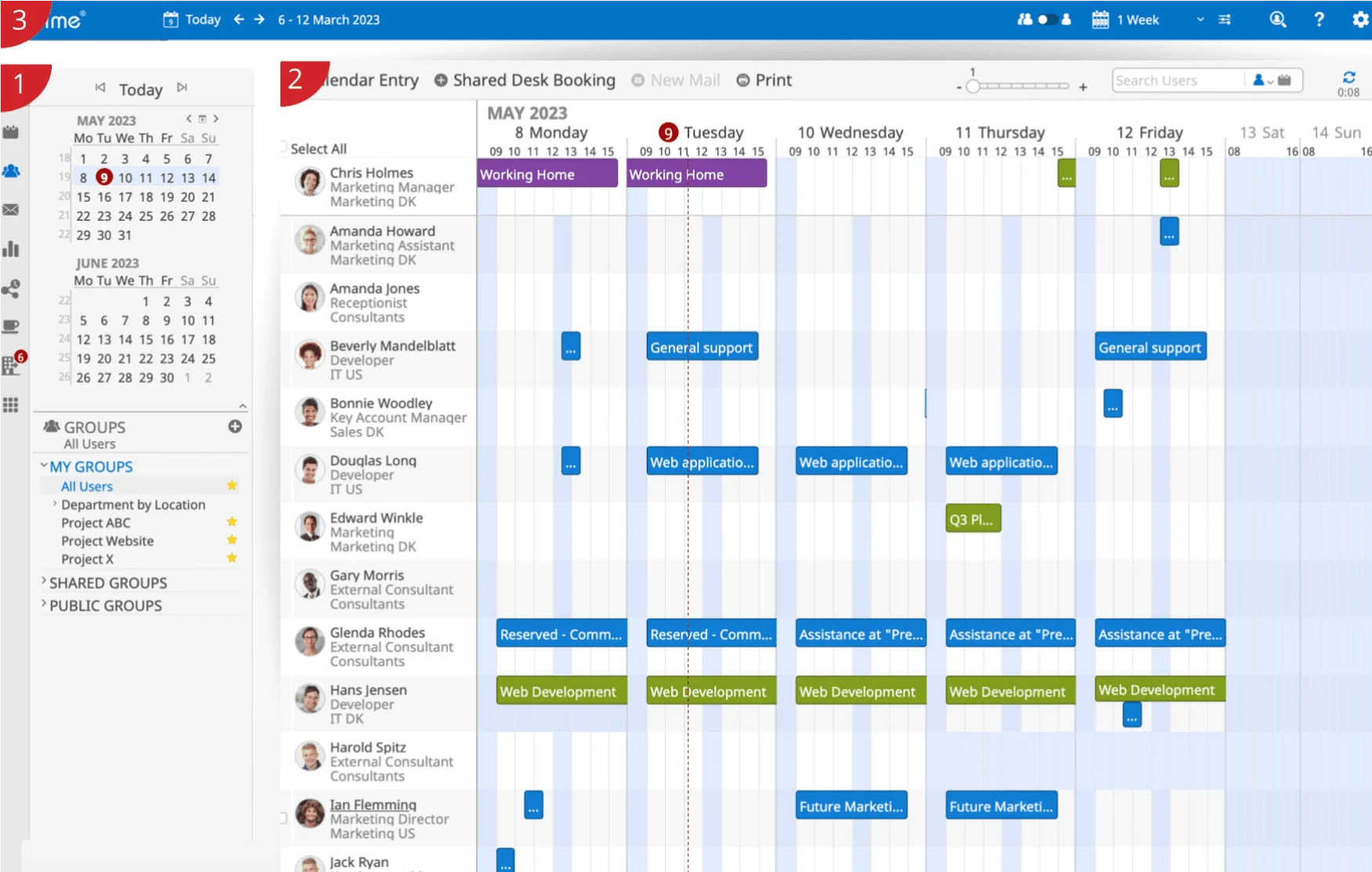
 

DESKTOP
  • Added new keyboard shortcuts:Alt (Option) + D = Days
    Alt (Option) + W = Weeks
    Ctrl (Command) + P = Print
  • Introduced an icon at the top of the Desktop interface to open the Catering Manager, available to users with the necessary roles.
  • Implemented a limit on email creation to selected OnTime users, restricting the total length of email addresses to 2,048 characters, due to a technical URL limitation.
  • Added a new checkbox to "Check/Uncheck All in Group Only," improving usability when switching between groups while selecting.
CATERING DESKTOP
  • Payable Actions Realignment:
    "Payable" Actions: Users can now offer order adjustments (edit) and then save the order, moving it to the Billing status.
    "Non-payable" Actions: Users can now directly move an order to the Cancelled status.
  • Several improvements have been made to the print process. As a result, the "Print Picklist" option has been removed, and its functionality has been reorganized under the new print logic.
  • The participant count is now an editable field. Initially, the default value is set to the number of participants for the meeting, but the user can modify this as needed.
CONFIG
  • Added OnTime Events as described above.

Bug Fixes

DESKTOP
  • Fixed an issue where users could select groups for search to which they did not have access.
  • Resolved an issue preventing users with edit rights for another user's calendar from deleting a poll in the individual view.
  • Fixed an issue where the "Share My Time" feature did not allow editing of Meeting Types by clicking the pen icon.
  • Resolved an issue where MacOS users could not select dates to vote for in Pollarity when using the Safari browser.
  • The Scheduler now correctly shows a room as unavailable if the room has a "Blocker Date" set from the Room & Resource database.
MOBILE
  • Fixed an issue where most icons were unresponsive to user interactions. All icons now function as expected.
  • Resolved an issue where the selected number on the "+" icon was not resetting when switching groups.
Version 11.2.2
5. July, 2024
Welcome to the latest update. We've made several improvements, bug fixes, and addressed potential security vulnerabilities in this release. While we highlight key changes in these notes, please note that not all updates may be detailed here. It's a reflection of our ongoing commitment to enhance performance and user experience while ensuring the safety of your data. We recommend going through the information provided for a snapshot of the most pertinent changes.

Bug Fixes

ONTIME DESKTOP
  • Fixed Issue with Pollarity Voting: Resolved a problem where users were unable to vote using the Pollarity voting feature in the desktop interface when accessing via the Safari browser on Mac computers.
  • Advanced Search Improvements: In List View, the Advanced Search will no longer return groups that the user does not have access to.

Version 11.2.1
7. June, 2024
Welcome to the latest update. We've made several improvements, bug fixes, and addressed potential security vulnerabilities in this release. While we highlight key changes in these notes, please note that not all updates may be detailed here. It's a reflection of our ongoing commitment to enhance performance and user experience while ensuring the safety of your data. We recommend going through the information provided for a snapshot of the most pertinent changes.

Bug Fixes

ONTIME DESKTOP
  • Default settings Branding did not work - only Global settings were applied.
  • Error during startup if the previous group no longer existed - Uncaught Type Error.
  • Time Off request could give an error if User or Approver had overlay users, resulting in a circular JSON string.
  • UserPage title did not wrap very long titles, pushing the access icon out of sight.
  • Language switcher for Nederlands was missing an "s".
ONTIME CLIENT DATABASE
  • The DesktopSSO (alias WebSSO) page would not load OnTime due to too strict security settings.
ONTIME CONFIG DATABASE
  • Creating a new Role gave an error "Object variable not set".
ONTIME ADMIN
  • Reading ACL for TeamCalendars was not processed correctly during the run of admin tasks.
ONTIME EXCHANGE SERVLET
  • Fix Exchange read of Permissions for mail users migrated to Exchange from Domino.
  • The Exchange User Permission got cleared by the User Role process.

Version 11.2.0
16. May, 2024
Welcome to the latest update. We've made several improvements, bug fixes, and addressed potential security vulnerabilities in this release. While we highlight key changes in these notes, please note that not all updates may be detailed here. It's a reflection of our ongoing commitment to enhance performance and user experience while ensuring the safety of your data. We recommend going through the information provided for a snapshot of the most pertinent changes.

Improvements

ONTIME DESKTOP

A walk towards Compliance with "The European Accessibility Act 2025": This release marks our first step towards compliance with EU Directive 2019/882, with a focus on accessibility features. Stay tuned for further enhancements as we work towards full compliance by June 2025. The new features will hopefully benefit all users. Some of the new features in this version are:

  • Revamped UI Experience: Experience a complete overhaul of the desktop interface with significant enhancements to nearly all front-end components, delivering a sleek and intuitive user experience.
  • Robust keyboard navigation with an extensive shortcut library and improved screen reader compatibility.
  • Exposed numerous settings to minimize the number of clicks required for each operation, enhancing efficiency and productivity.
  • Enhanced Group Panel Functionality: Explore new options in the group panel, including search functionality and the ability to assign alias names to groups in "My Groups," offering greater flexibility in group management.
  • Default settings: User in top is no longer an option.
  • For Share My Time, added a new repeat pattern that only repeats on weekdays. This prevents meetings on weekends from being available if not wanted.
  • Implemented Content Security Policy (CSP) by adding HTML header meta to the OnTime pages.
  • It is now possible for invitees to modify the subject for meetings.
  • It is now possible to disable the option "Use Endlessly" for all users for links for "Share My Time".
  • Share My Time now has a Name field. This Name value is an internal name used to manage the different Share My Time links.
  • The "Some invitees use other mail programs" option can now be locked to "On".
ONTIME MOBILE
  • Implemented Content Security Policy (CSP) by adding HTML header meta to the OnTime pages.
ONTIME CATERING DESKTOP
  • Implemented Content Security Policy (CSP) by adding HTML header meta to the OnTime pages.
ONTIME CATERING MOBILE
  • Implemented Content Security Policy (CSP) by adding HTML header meta to the OnTime pages.
ONTIME CONFIG
  • Added option to select Mail Principal (send from) for Pollarity and "Share My Time" background mails.
ONTIME MAIN SERVLET
  • Added option to select Mail Principal (send from) for Pollarity and "Share My Time" background mails.
ONTIME EXCHANGE SERVLET
  • Added option to read Exchange Permissions. This option can be turned on or off.
  • Fixed the HTTP result headers to contain Content-Length (and support gzip).

Bug Fixes

ONTIME DESKTOP
  • A repeated meeting with an Online Meeting (Zoom, Teams, or Domino) was not displayed in the repeat row.
  • Changing alarm settings for a meeting in OnTime did not update the meeting in Notes. There was no issue when creating the alarm initially.
  • Fixed an issue where clicking "Open in Notes" had no effect.
  • Fixed an issue where for "List" view it was not possible to use the keyboard to change the date interval.
ONTIME CONFIGURATION
  • Custom 1, 2, 3 was missing for resources in name format.
  • Missing Login Method on External server document.
ONTIME ADMIN PROCESS
  • Fixed an issue where ACL information for Team Calendars was not read correctly (A Team Calendar was handled as a Room/Resource).


Improvements, bug fixes, and addressing security vulnerabilities

The versions listed includes both improvements, bug fixes, and addressed potential security vulnerabilities. While we highlight key changes in these notes, please note that not all updates may be detailed here. It’s a reflection of our ongoing commitment to enhance performance and user experience while ensuring the safety of your data. We recommend going through the information provided for a snapshot of the most pertinent changes.

Version 3.0.2
13. January, 2026
Welcome to the latest update. We've made several improvements, bug fixes, and addressed potential security vulnerabilities in this release. While we highlight key changes in these notes, please note that not all updates may be detailed here. It's a reflection of our ongoing commitment to enhance performance and user experience while ensuring the safety of your data. We recommend going through the information provided for a snapshot of the most pertinent changes.

Bug Fixes

  • Display Selection Menu Error: Resolved a regression issue where typing in the password field within the display selection menu caused an error to be thrown.

  • Missing Event Titles for Multi-Room Bookings (Microsoft Only): Fixed an issue in the Microsoft version of OnTime where, if an event was booked across multiple rooms, the event title was sometimes only shown for the first room listed

Version 3.0.1
12. December, 2025
Welcome to the latest update. We've made several improvements, bug fixes, and addressed potential security vulnerabilities in this release. While we highlight key changes in these notes, please note that not all updates may be detailed here. It's a reflection of our ongoing commitment to enhance performance and user experience while ensuring the safety of your data. We recommend going through the information provided for a snapshot of the most pertinent changes.

Improvements

  • If a room-only booking does not have a chairperson assigned, no email will be sent.
  • To release or book a room from the display the RoomDisplay role must have editor access to the rooms.
  • For Meetings the Room Display role must have read access to the user’s calendar for the Release button to appear.
  • Changes to a meeting’s subject are now updated in Room Display when changed.
  • The item cache is now cleared every hour to ensure that changes in access rights take effect.

Bug Fixes

  • Fixed an issue where characters outside the Latin-1 charset (e.g., Japanese) were not supported in passwords. These characters are now fully supported.
  • In the Admin UI, the Log view now automatically updates again.
  • Fixed an issue where the date/time interval used when booking a room on the display did not respect the selected region settings.
  • Fixed an issue where Book/Release actions failed when the user did not have sufficient access to the room.
Version 3.0.0
28. October, 2025
Welcome to the latest update. We've made several improvements, bug fixes, and addressed potential security vulnerabilities in this release. While we highlight key changes in these notes, please note that not all updates may be detailed here. It's a reflection of our ongoing commitment to enhance performance and user experience while ensuring the safety of your data. We recommend going through the information provided for a snapshot of the most pertinent changes.

Improvements

The new version includes:

  • The optional check-in feature: If no one checks in within the set timeframe, the room is automatically released - freeing it up for colleagues who actually need it. No more no-shows, just smarter use of your resources.

  • QR code functionality: We have added a QR code function on the displays allowing you to scan it with your OnTime mobile to go directly to that room to make a quick booking, reserve it for later, or add a meeting subject, offering even greater flexibility in how you manage your rooms.

  • Improved room overview in OnTime mobil: The updated mobile client now works seamlessly with your room displays, providing a clearer overview of available and occupied meeting rooms and much more.

Version 2.0.4
16. May, 2025
Welcome to the latest update. We've made several improvements, bug fixes, and addressed potential security vulnerabilities in this release. While we highlight key changes in these notes, please note that not all updates may be detailed here. It's a reflection of our ongoing commitment to enhance performance and user experience while ensuring the safety of your data. We recommend going through the information provided for a snapshot of the most pertinent changes.

Improvements

  • Introduced several enhancements to the installation process and upgrade scripts to improve reliability and ease of use.
  • Upgraded to Node.js v20.19.1 for improved performance and compatibility.
  • Replaced the PM2 Management Tool with a built-in OnTime service solution for Room Display, simplifying both installation and upgrades. Refer to the manual for instructions on removing PM2 from your setup.

Bug Fixes

  • Re-Added default Images that were lost in the 2.0.0 version
  • Resolved an issue where the Microsoft read operation for meeting details did not utilize the cache as expected, resulting in excessive API calls.
Version 1.0.11
31. December, 2024
Welcome to the latest update. We've made several improvements, bug fixes, and addressed potential security vulnerabilities in this release. While we highlight key changes in these notes, please note that not all updates may be detailed here. It's a reflection of our ongoing commitment to enhance performance and user experience while ensuring the safety of your data. We recommend going through the information provided for a snapshot of the most pertinent changes.

Improvements

This version accumulates all minor changes and improvements since version 1.0.0. Moving forward the release notes will follow each sub release.

Version 1.0.0
18. September, 2023
Welcome to the latest update. We've made several improvements, bug fixes, and addressed potential security vulnerabilities in this release. While we highlight key changes in these notes, please note that not all updates may be detailed here. It's a reflection of our ongoing commitment to enhance performance and user experience while ensuring the safety of your data. We recommend going through the information provided for a snapshot of the most pertinent changes.

Improvements

The Initial Release of OnTime Room Display

Room Display offers a convenient solution to seamlessly manage meeting rooms and conference areas. With Room Display, you can effortlessly cross-check, book, and monitor the availability of meeting spaces, whether you’re using your OnTime client or directly interacting with the display itself.

The straightforward and intuitive nature of the OnTime Room Display inevitably leads to a noticeable increase in meeting room utilization.


https://youtu.be/hA66ZHelEBU

Get in Contact

We’re here to help! Please fill out the form below, and we’ll get back to you as soon as possible — typically within 1–3 business days.

By submitting this form, you agree that your information will be stored securely and only used to respond to your inquiry in accordance with our Privacy Policy. We do not share your personal data with third parties without your consent.

Thank you for reaching out!
The OnTime Team