Stop wasting time on calendar chaos.
With OnTime Group Calendar, everyone stays aligned…
See how we can improve the way your team works
— with 5 proven methods in just 60 minutes
Microsoft Partner | Installed in Your Environment | GDPR Compliant
Working with calendars is like sitting with pieces from many different puzzles, trying to make sense of them.
Without a group calendar, team planning quickly falls apart. Everyone manages their own calendar, updates get missed, and no one sees the full picture. Meetings overlap, rooms double-book, and you waste hours coordinating back and forth.
With OnTime, that chaos becomes one clear panoramic view.

OnTime shows everyone’s availability instantly, so scheduling is done in seconds — no endless back-and-forth.
With a single shared group calendar, you see the full picture across teams, offices, and time zones.
OnTime prevents overlaps and mistakes, giving your team confidence in every booking.
Delegate and assistant features make it easy to schedule for executives without delays.
OnTime installs directly in your tenant, keeping your data private and compliant.
Book a consultation, and one of our OnTime consultants will get in touch to find a good time to chat about your needs.

Start a 60-day trial and let OnTime use your calendar data to unlock all features. Discover how it fits into your routine and benefits you.

Whenever you’re ready to start your OnTime journey, we’ll help you get up and running in no time.


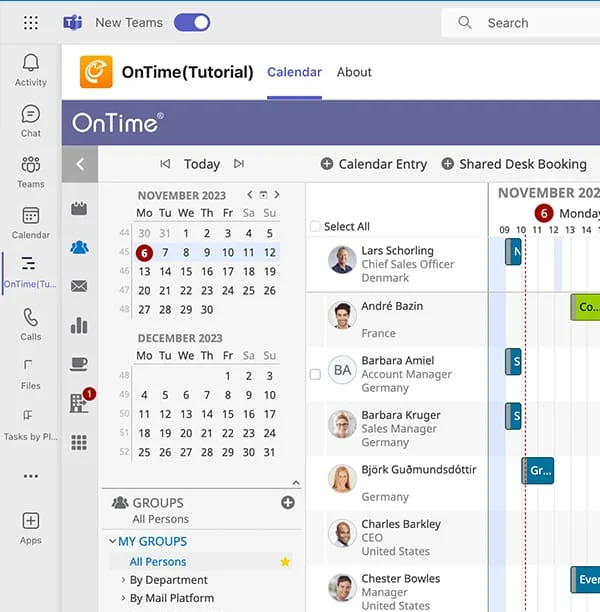
See everyone’s schedule in the way that suits you. Switch between views, stretch the timeline, create groups, or manage calendars on behalf of others — always with a clear overview of what’s going on.

Set up, move, or cancel meetings in minutes. The Meeting Assistant highlights green time slots where everyone’s free, making it easy to book meetings that actually work for the whole team.

Replace external vacation tools with OnTime. The Time Off view shows who’s away, while the built-in approval system keeps every request smooth, organised, and easy to manage.

Set up meetings with anyone inside or outside your company. Poll for a common time or share your availability with a simple link. This reduces back-and-forth and speeds up the meeting process.

Work directly in colleagues’ calendars with the right permissions. Zoom in on a single schedule or switch between multiple calendars with ease. A clear overview and efficient control of daily planning.

With OnTime inside Teams, you get a complete group calendar right where you collaborate. See availability at a glance, schedule meetings faster, manage time off – all without ever leaving Teams.

No. OnTime is installed directly in your organization’s own Microsoft tenant. This means you stay in full control of data and infrastructure.
OnTime is built specifically for enterprises that need a clear overview across large teams and departments. It goes beyond personal calendars with advanced group visibility, delegation, and scheduling features, making it the perfect companion to your MS Outlook.
Very secure — because it’s installed inside your own tenant, your data never leaves your infrastructure. OnTime is fully GDPR compliant and trusted by enterprises worldwide.
No. You discovered us on Azure Marketplace, but the software itself is installed in your own environment. The Marketplace simply makes finding and starting with OnTime easier.
Most organizations are up and running in days. We’ll guide you through consultation, installation, and setup so you get results quickly.
Microsoft Partner | Installed in Your Environment | GDPR Compliant
Let’s define your 5 wins together! Please fill out the form below, and we’ll get back to you as soon as possible.
By submitting this form, you agree that your information will be stored securely and only used to respond to your inquiry in accordance with our Privacy Policy. We do not share your personal data with third parties without your consent.
Thank you for reaching out!
The OnTime Team